
What is IPTV Smarters Pro?
IPTV Smarters Pro is one of the most popular IPTV applications available today. It works on Smart TV, Android, iPhone, iPad, and PC, allowing you to watch 1000+ channels from anywhere in the world.
Whether you have an M3U playlist or Xtream Codes, IPTV Smarters Pro makes it easy to set up and start watching in just a few minutes.
What You Need Before You Start
Before adding your playlist, make sure you have:
- ✅ IPTV Smarters Pro installed on your device
- ✅ Your M3U URL or Xtream Codes (username, password, and server URL)
- ✅ A stable internet connection (minimum 10 Mbps recommended)
- ✅ An active IPTV subscription from your provider (e.g. iptvnova.net)
Method 1: How to Add M3U Playlist in IPTV Smarters Pro
Step-by-Step Guide:
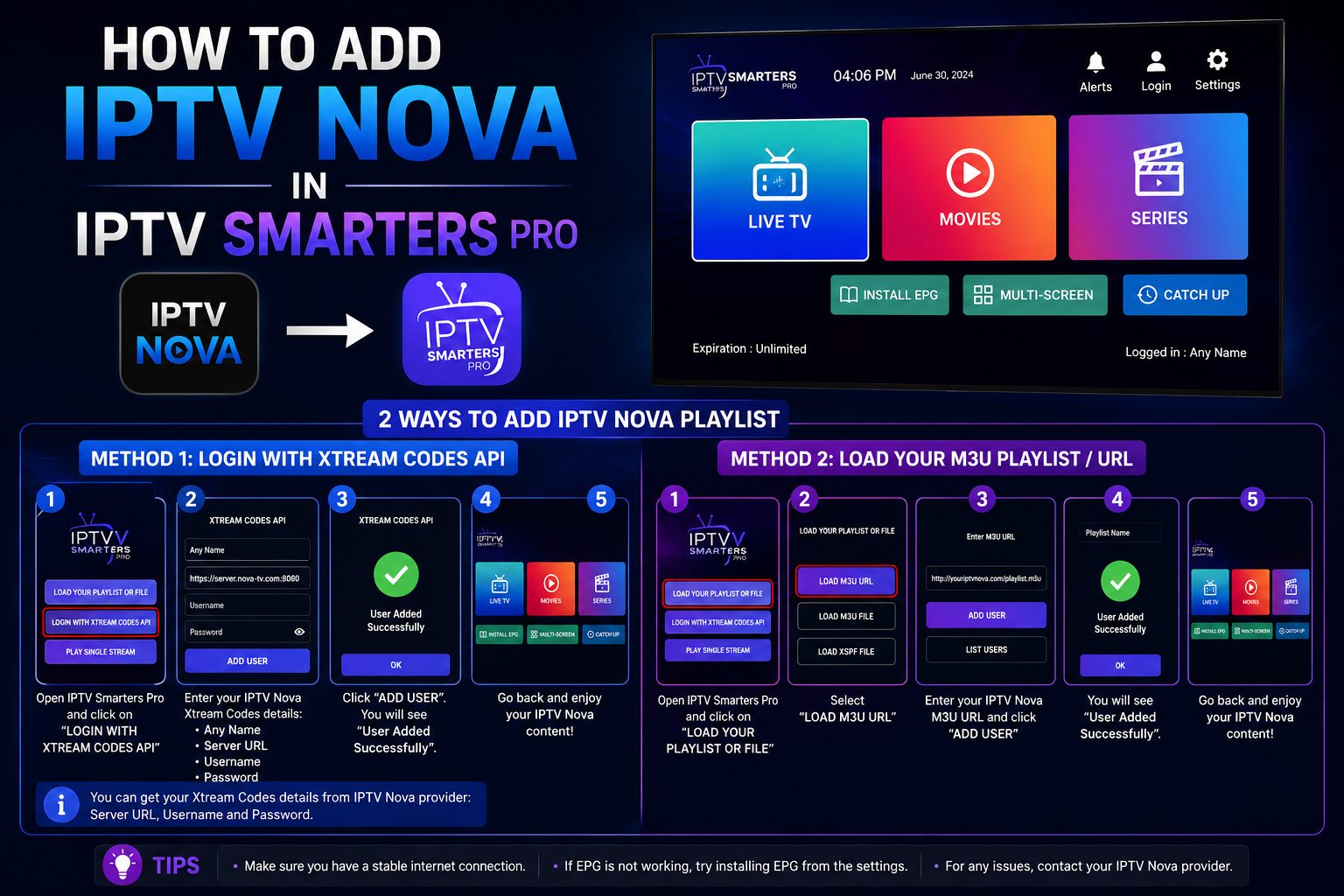
Step 1: Open IPTV Smarters Pro on your device
Step 2: On the home screen, tap “Add User” or “Login with M3U URL”
Step 3: Fill in the following details:
- 👤 Your Name – Enter any name (e.g. IPTV Nova)
- 🔗 M3U URL – Paste your M3U playlist link provided by your IPTV provider
Step 4: Tap “Add User” to confirm
Step 5: Wait for the playlist to load (this may take 1-2 minutes depending on your internet speed)
Step 6: Once loaded, you will see all your channels, movies, and series ready to watch! 🎉
Method 2: How to Add Xtream Codes in IPTV Smarters Pro
Xtream Codes is the most stable and recommended method for connecting to your IPTV service.
Step-by-Step Guide:
Step 1: Open IPTV Smarters Pro
Step 2: Select “Login with Xtream Codes API”
Step 3: Enter your details:
- 👤 Your Name – Any name you prefer
- 🌐 Server URL – Provided by your IPTV provider
- 🔑 Username – Your IPTV username
- 🔒 Password – Your IPTV password
Step 4: Tap “Add User”
Step 5: The app will connect and load all your channels automatically
Step 6: Start watching! 📺
M3U vs Xtream Codes – Which is Better?
| Feature | M3U Playlist | Xtream Codes |
|---|---|---|
| Setup | Easy | Easy |
| Stability | ⚠️ Good | ✅ Excellent |
| EPG (TV Guide) | ⚠️ Limited | ✅ Full |
| VOD Support | ⚠️ Basic | ✅ Full |
| Auto Updates | ❌ Manual | ✅ Automatic |
| Recommended | ⚠️ Basic users | ✅ All users |
💡 Tip: Always use Xtream Codes if your IPTV provider supports it – it is faster, more stable, and includes full EPG and VOD support!
How to Install IPTV Smarters Pro on Different Devices
📱 Android (Phone/Tablet):
- Open Google Play Store
- Search for “IPTV Smarters Pro”
- Tap Install
- Open the app and follow the steps above
📺 Smart TV (Android TV):
- Go to Google Play Store on your TV
- Search “IPTV Smarters Pro”
- Install and open
- Add your M3U or Xtream Codes
🍎 iPhone / iPad:
- Open App Store
- Search “IPTV Smarters Pro”
- Download and install
- Follow the same setup steps
💻 Windows PC:
- Download the app from the official website or Microsoft Store
- Install and open
- Add your playlist using M3U or Xtream Codes
📦 Amazon Fire Stick:
- Go to Amazon App Store
- Search “IPTV Smarters Pro”
- Install the app
- Add your credentials and enjoy!
Troubleshooting – Common Issues & Fixes
❌ Channels not loading?
- Check your internet connection
- Make sure your M3U URL or Xtream Codes are correct
- Contact your IPTV provider to verify your subscription is active
❌ App keeps freezing or buffering?
- Use a wired ethernet connection instead of Wi-Fi
- Increase your internet speed to at least 20 Mbps
- Clear the app cache and restart
❌ EPG (TV Guide) not showing?
- Use Xtream Codes instead of M3U
- Go to Settings in the app and update the EPG URL
- Wait 5-10 minutes for the guide to load
❌ Some channels show error?
- The channel may be temporarily offline
- Contact your IPTV provider support
- Try refreshing your playlist
Why Choose IPTV Nova as Your IPTV Provider?
If you are looking for a reliable IPTV provider to use with IPTV Smarters Pro, IPTV Nova is the perfect choice:
- 📺 1000+ channels in HD and 4K
- 🎬 Full VOD library – movies and series
- 📡 Stable Xtream Codes connection
- 💰 Affordable prices starting from just 5€/month
- 🆓 Free 24-hour trial – no commitment
- 🔧 24/7 customer support
👉 Visit iptvnova.net and get your free trial today!
Frequently Asked Questions (FAQ)
❓ Is IPTV Smarters Pro free? Yes, IPTV Smarters Pro is free to download. However, you need an active IPTV subscription to access channels.
❓ Can I use IPTV Smarters Pro on multiple devices? Yes! You can use it on multiple devices, but check with your IPTV provider how many simultaneous connections are allowed.
❓ Where do I get my M3U URL or Xtream Codes? Your IPTV provider (such as iptvnova.net) will send you these details after you subscribe.
❓ Does IPTV Smarters Pro support 4K? Yes, IPTV Smarters Pro supports up to 4K streaming if your IPTV provider and internet connection support it.
❓ What if I lose my login details? Contact your IPTV provider’s support team and they will resend your credentials.
Conclusion
Setting up IPTV Smarters Pro with your M3U playlist or Xtream Codes is quick and easy. Whether you are on Android, iPhone, Smart TV, or PC, you can start watching 1000+ channels in just a few minutes.
For the best experience, we recommend using IPTV Nova as your IPTV provider. Visit iptvnova.net, grab your free 24-hour trial, and enjoy unlimited entertainment today!






